Introduction
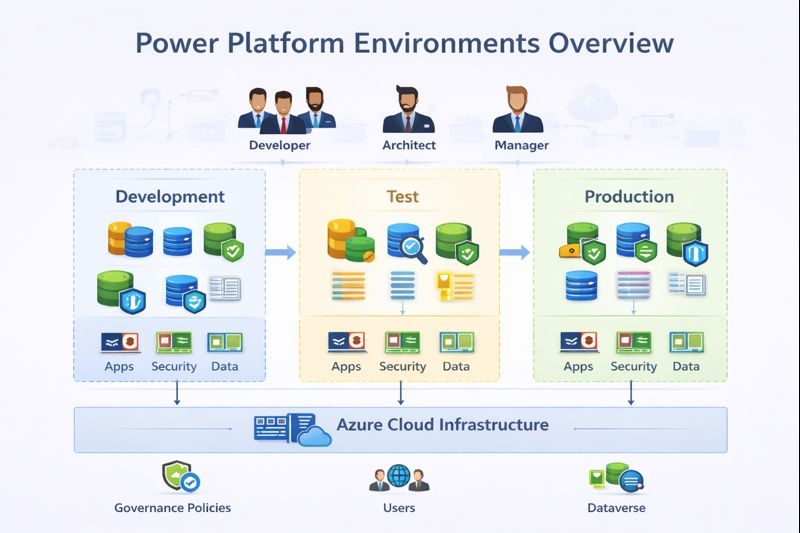
A power Platform environment is a security,data and governance boundary - not a folder or workspace. An environment contains:
- Apps
- Flows
- Dataverse
- Security configuration
- Capacity configuration
- ALM state
When to Use This
Environment prevents the risk of unauthorized change to application or data. They support Software development lifecycle thus preventing test user accessing or modifying the live data. It also prevent the risk of development changes being visible to production users. It enforces governance and security by design to meet compliance and regulatory requirements.
Types of Environment
The different types of environment are listed below:
- Default
- Sandbox
- Production
- Developer
- Trial
Each type behaves differently in below areas:
- Data retention
- Reset capability
- ALM expectations
- Governance risk
High-Level Environment Overview
Power Platform Tenant
|
|- Default Environment
|- Dev Environment
|- Test/UAT Environment
|- Production Environment
|- Specialized Environmen
Why Default Environment is dangerous?
The Default Environment is auto created for each tenant and allows access to all the users tenant wide. This environment cannot be deleted and should be locked down and monitored. It should not be used as production environment.
Failure Pattern
Citizen builds app in Default
      |
App gains adoption
      |
Data grows
      |
No ALM, no isolation
      |
Compliance & support crisis
Dataverse Capacity Overview
Power platform capacity is allocated and enforced at tenant level and consumed at environment level. There are three types of capacity as listed below:
- Database Capacity
- File Capacity
- Log Capacity
While developer and architect generally design and optimize around Database and File Capacity, Log Capacity that includes Audit logs, Plugin traces, Flow run history are often overlooked causing it grow overtime and hit the Capacity threshold limit. Once the limit is hit, the write access is blocked causing production outage.
Platform Limits
There are certain limitation that are enforced by platform and not configurable or cannot be by passed. These limitation are inplace to keep Power Platform health green, and to prevent platform being abused.
- API request limits
- Concurrent flow runs
- Plugin execution timeouts
- Bulk operation limits
- Search index delays
Role Based Perspective
- Admin
- Responsible for environment strategy and Capacity Monitoring
- Governs the Default environment
- Manages the environment lifecycle and environment access
- Architect
Responsible for below key decisions regarding environment, which should be thought during design times
- Number of environment
- Isolation model(per app, per BU or per region)
- Regulated vs Non Regulated workloads
- Capacity forecasting
- Promotion Path
- Developer
Developer should consider below items while working in Power Platform:
- Environment-specific behavior exists
- APIs behave differently under load.
- Capacity limits affect design.
- Should not hardcode environment values.
- Testing should be done in test environment with minimum required privilege.
- Avoid bulk operation in power automate.
- User If above things are not done correctly, user will face below issue:
- App stops working
- Uploads no longer work
- System is slow today
Best Practices
- Design environment strategy first
- Seperate Dev,Test,Prod environment
- Lock down Default environment
- Monitor capacity continously
- Assign clear ownership per environment
- Avoid treating Sandbox environment as production
Common Mistakes
- One environment is enough
- Capacity is a licensing issue
Summary
Environment and Capacity are foundational architecture decisions and not operational details. If done correctly helps organization to scale and govern effectively.