Introduction
Model-driven apps are designed for data-centric, process-heavy enterprise systems where:
- Data volume is large
- Security and business logic are complex
- UI consistency matters more than pixel-perfect design
- Processes span multiple roles and stages
Unlike Canvas apps, model driven apps:
- Execute most logic server-side
- Are metadata driven
- Scale better for large dataset by default
When teams use Canvas apps to solve model-driven problems, performance and governance usually collapse
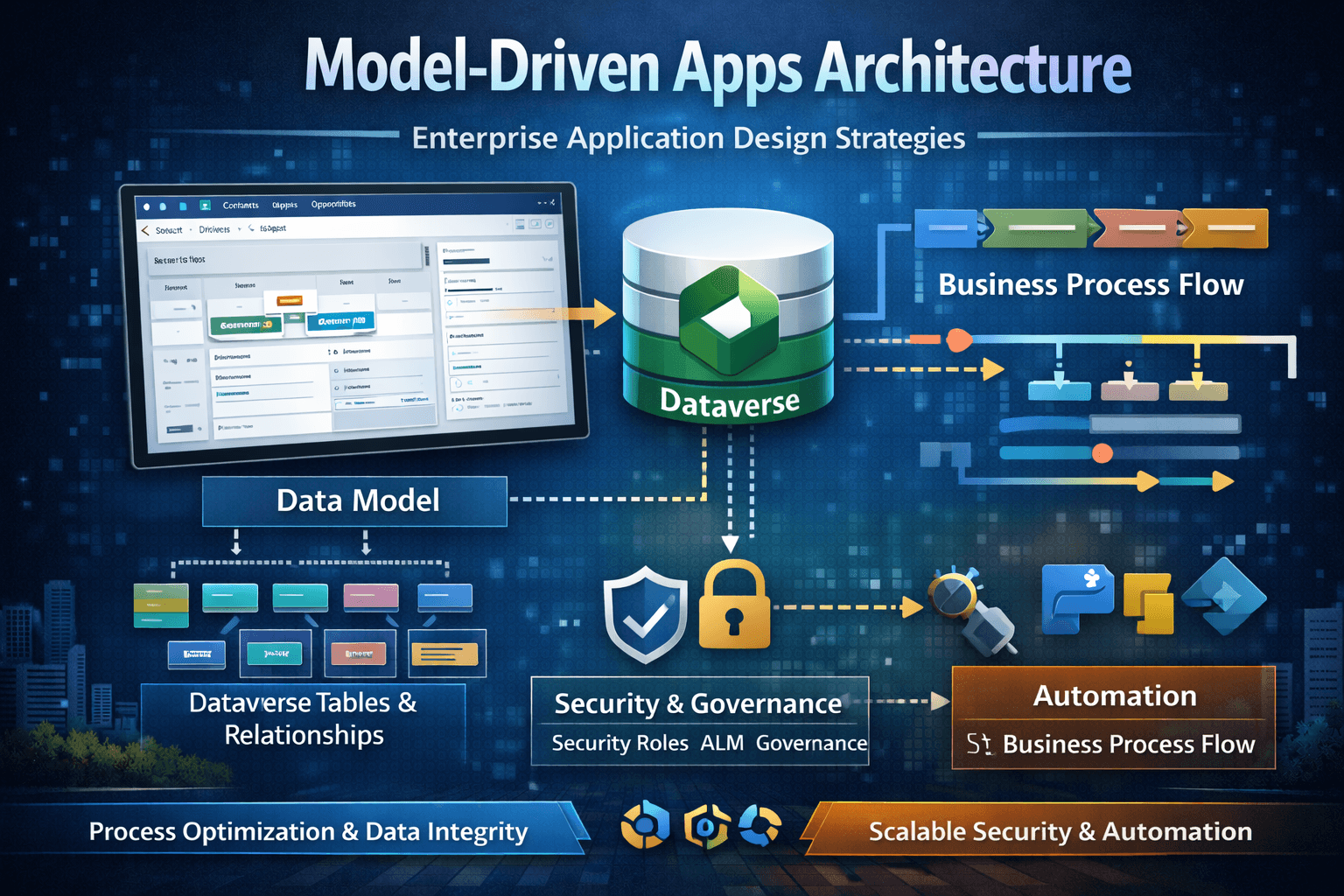
Model-Driven Runtime Architecture
High Level Runtime Flow
User
  |
Model-Driven App Shell
  |
  |- Metadata (Forms,Views,Commands)
  |- Security Evaluation
  |- Business Process Flow
Dataverse
  |
  |- Query Execution
  |- Plugin pipeline
  |- Security trimming
  |
Rendered UI
Key difference from Canvas
- Queries and filtering are server-driven
- Pagination is automatic
- Delegation is not exposed to the user
Model-Driven Performance Tuning
View Performance
Best practices
- Limit columns shown in views
- Avoid calculated fields in views
- Avoid complex OR conditions
- Use indexed columns where possible
- Avoid unnecessary related entity columns
Anti-patternShow everything in the default view
Form Load Optimization
Form load time is affected by everything configured on the form, not just data.
What Slows Forms Down
- Too many fields
- Multiple subgrids loading immediately
- Embedded Canvas Apps
- Heavy Javascript on load
- Business rules evaluated on load
- BPF initialization
Good vs Bad Form Design
Bad Form
Main Form
  |- 80+ fields
  |- 6 subgrids
  |- 3 business rules
  |- 2 canvas apps
  |- Javascript onLoad
  |- BPF auto-initialized
Symptoms
- Slow initial load
- Sluggish navigation
- Poor mobile experience
Optimized Form
Main Form
  |- Core fields only
  |- Tabs with lazy loading
  |- Subgrids load on demand
  |- Minimal javascript
  |- BPF enabled only if needed
Form Optimization Techniques
- Use tabs with deferred loading
- Split forms by role (Don't overload one form)
- Remove unused fields from the form entirely
- Avoid logic in onLoad unless critical
- Prefer server side validation over form scripts
Business Process Flows (BPFs) - Power and Pitfalls
What BPFs are Good for
- Guiding users through stages
- Visualizing process progression
- Enforcing lightweight process structure
BPF Anti-Patterns
Anti-Pattern 1 - Using BPF as Validation Engine
- Expecting BPF stage gating to enforce rules
- Assuming API calls respect BPF logic
Reality:
- BPFs are UI guidance, not enforcement*
Anti Pattern 2 - Pne BPF for All Roles
- Sales, service, finance all forced into one flow
- Irrelevant stages for many users
Result
- User frustation
- Process abandonment
Anti Pattern 3 - Too many Stages and Steps
- Long, complex flows
- Slow UI
- Hard to maintain
Good BPF Design Pattern
Entity
  |- BPF for Role A (Sales)
  |- BPF for Role B (Service)
  |- Optional BPF for Exceptions
Rules
- Keep stages minimal
- Align with real business milestones
- Enforce critical rules in Dataverse logic, not BPFs
Command Bar Customization Guidance
Why Command Bars Matter
Command bars control:
- User actions
- Discoverability
- Process flow
- UX consistency
Poor command bar design leads to:
- Confusion
- Accidental actions
- Over-customization
Command Bar Customization Options:
- Out of box commands
- Command rules(enable/disable/visibility)
- Javascript-backed commands
- Custom actions/ Custom APIs
Good vs Bad Command Bar Design
Bad Pattern
- Many custom buttons
- Logic in Javascript only
- No security alignment
- Commands always visible
Enetrprise Pattern
Command Bar
  |- Few, high-value actions
  |- Visibility tied to security roles
  |- Server-side validation (plugin/API)
  |- Client logic only for UX
When to use Custom API with Command Bar
Use Custom API when:
- Action represents a business operation
- Must be callable from multiple clients
- Needs server-side enforcement
Example:
- Approve invoice
- Generate Work order
- Close Project with Validation
Javascript in Model Driven Apps
When Javascript is Appropriate
- UI behvior (show/hide)
- Client Validation
- Navigation assistance
When Javascript is Dangerous
- Business rules
- Data integrity
- Security enforcement
- Cross-record updates
Javascript should never be the only place a rule exists
Scaling Model-Driven Apps to 1M+ records
Why Model-Driven Scales Better than Canvas
- Server side paging
- Optimized views
- Built-in query shaping
- Metadata-driven UI
Enetrprise Pattern for Large Datasets
- Use search-first UX
- Use views scoped by role/territory/date
- Avoid "All Records" view
- Partition data logically
- Use Power BI for analytics, not views
Role-Based Perspective
Admin
- Manage forms/views cleanly
- Monitor performance complaints
- Enforce ALM discipline
Architect
- Choose model-driven for complex data/process apps
- Enforce UX standards
- Balance configurability with maintainablility
Developer
- Minimize client scripts
- Use Custom APIs for actions
- Optimize forms and views early
User
- Expect consistency
- Expect role-specific experiences
- Excpect guided processes
Common Confusion and Failure Scenarios
- Model-Driven is Old UI
- It is the most scalable UI for Dataverse centric system
- BPF Enforce Business Rules
- Only server logic enforces truth
- We Need Javascript Everywhere
- Most JS exists due to poor data/logic placement
Summary
Model Driven apps:
- Are enterprise grade by default
- Scale better for large datasets
- Require discipline in customization
- Benefit from server-side logic
- Provide consistent, secure UX when designed intenionally