Introduction
Power platform is built on identity centric design and hence follows below four non-negotiable principles
- Identity first
- Security by default
- Metadata driven
- Governed extensibly
So, what does it mean by identity in Power Platform?
Identity answers below four questions at runtime
- Who is calling?
- Are they authenticated?
- What are they allowed to do?
- In which environment and context?
These questions needs to be answered every time for each interaction and just at login.
So we can safely say identity in Power platform is not just another Azure Entra ID setup instead it is
Authentication + Authorization + Context + Governance
When to Use This
Every below interaction is authenticated via Microsoft Entra ID and executes under context of user or application identity.
- User action
- Power automate runs
- API calls
- Integration
- Copilot interaction
Core Concepts
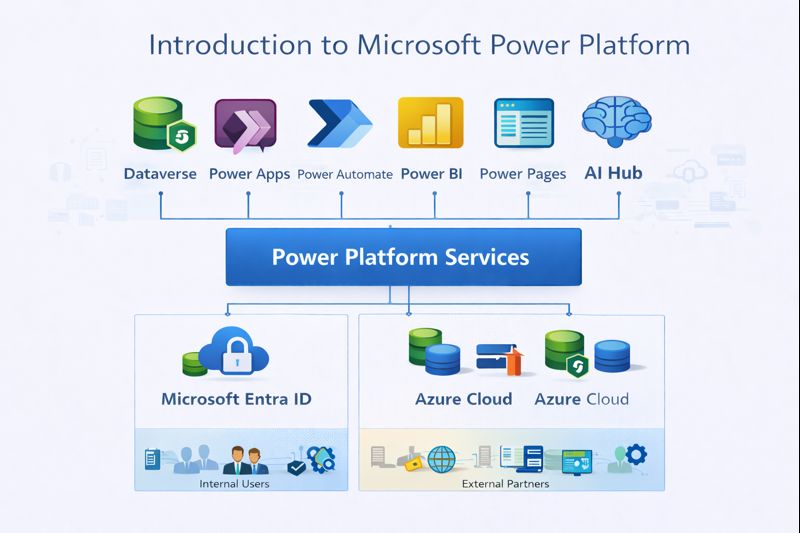
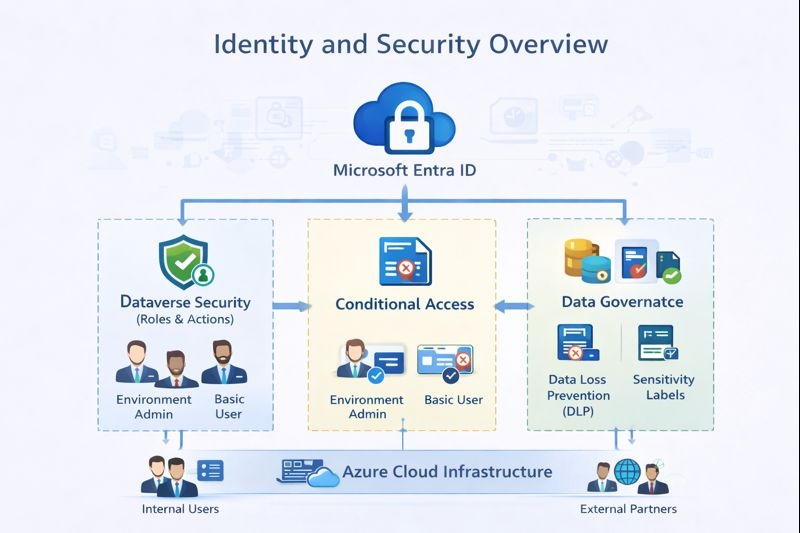
Identity in power platform consists of below core components
- Microsoft Entra ID
- Users
- Security Groups
- Service Principals
- Managed Identity
- Conditional Access policies
All these services are consumed by power platform in addition to its role based access to determine if the user is authorized to perform an action.
Detailed Technical security overview
User/App/Flow/API
        |
        |-Requests Token
        |
Microsoft Entra ID(Authentication and Token)
        |
        |- Issues Token(Scopes)
        |
Power Platform Service layer
        |
        |- Validates Token
        |- License Validation
        |- Environment access check
        |- DLP/Governance
        |
Dataverse Security exceution
        |
        |- Evaluates Business Unit
        |- Evaluates Security roles
        |- Evaluates Team Membership
        |- Evaluates Record Sharing
        |- Applies Record-Level Security
        |
Execution Allowed or Denied
Identity Types in Power Platform
- Human Users
They are real users of our application and used for interactive access from UI, manual approval and delegated automations. They require license and are subject to conditional access and permission can change dynamically based on security role and teams assigned. - Service Principals(App Registration)
It is non interactive user with no UI access mostly used for system to system integration, running background process. Although no license is required for such user, explicit dataverse security roles need to be assigned. They authenticate via client id and client secret or certificate to make api calls. If proper role is not assigned, it will result in failure. - Managed Identity
It is another type of non interactive user that is tied to Azure and mostly used in Azure related services like Azure Function, Logic Apps etc. Unlike Service Principals they are not tied to secret but bound by Azure resources. They also needs to be assigned proper security role in dataverse for it to access dataverse via api. Most failure happens because of incorrect role assignment of such users.
Role-Based Perspective
- Admin
Power platform administrator plays a vital role in enforcing security and governance. They have below responsibilities which makes the environment secure:- Tenant identity configuration via Security Groups
- License assignment to users
- Enforce governance via DLP policies
- Govern the roles assigned to user and Service principal
- Enforcing Conditional access
If these are not properly enforced, this may cause issues like- Licensed user unable to access environment
- Integration authentication succeds but fails
- Conditional access blocks background process
To prevent from any unwanted failure, administrator must follow some guardrails as mentioned below:- Never use personal account for integration
- Keep track of Service Principal centrally
- Align Conditional Access with automation needs
- Architect
Architect plays a important role to design a system that is secured and accessible by both human and integration users. Below are some of the key architectural decision that architect needs to make:
- Human vs System identity
- Delegated vs application access
- Managed Identity vs Service Principal
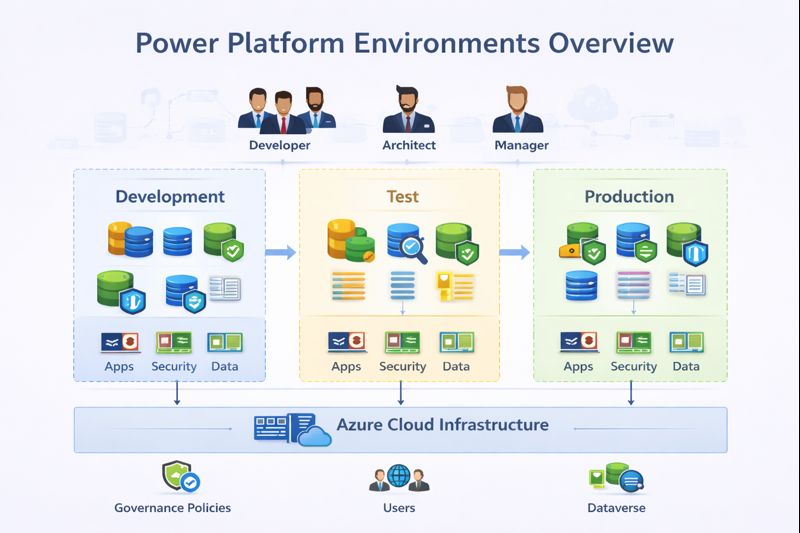
- Shared Identity vs Identity per environment
- Multi Tenant access strategy
This decision when taken correctly ensures below parameters are achieved:
- Predictable integration
- Secure automation
- Reduced access incidents
- Strong audit posture
- Easier debugging
- Developer
After an architect makes decision around security it is responsibility of a developer to implement it successfully. A developer must have below understanding clear so that this can be achieved:
- Delegated vs Application permission matters
- Identity context changes exceution behaviour
- Plugins and flows may run under different identity
- In a flow, trigger always executes under owner context but action runs under user context unless specified.
Without clear understanding, developer may face issues like:
- API works in postman but fails in app
- Flow works when triggered manually but automation fails.
These issues may be due to different identity context, where user has missing privilege to execute certain action. To prevent these issues, developer must take care of below things:
- Always document exceution identity
- Design for least privilege
- Test with non admin identity
- User When security is not implemented properly user may face below issues:
- Insufficient privilege error
- App becomes unusable due to data missing for user
These causes trust issues in user, loss of productivity and slow downs the adoption of application.
Best Practices
- Seperate human and system identities
- Use managed identities where possible
- Assign least privilege dataverse roles
- Align Conditional Access policy with automation
- Verify identity flows per environment
- Never hardcode credentials
- Do not use shared account for automation
- Do not grant System Administrator role to integration identity
- Never ignore identity lifecycle
Common Mistakes
- Confusing API permission with Dataverse securit role
- Admin access for integration account
- Not configuring environment access for Managed Identity
Summary
Identity is the exceution gatekeeper and root cause of most failures. This should be taken care at design time itself, instead of post development to avoid below issues:
- Broken integration
- Security incidents
- Automation failure
- Compliance risk